Signing up without mistakes: ChatGPT
Signing up for ChatGPT takes two minutes, but beginners hit the same typical sticking points: which email to use, why a phone number, what to do when the message never arrives. We walk through it step by step and cover why the service is free and how to tell the real app from a fake.
First the thing that lets you read on calmly: no card is asked for at sign-up. Until you type its details in yourself there is nothing to charge, and when the free limits run out the service simply asks you to wait until tomorrow — it doesn't ask for money.
Three words you'll meet a hundred times
Before touching any buttons, let's sort out three words. They come up constantly, and reading without them is uncomfortable.
- A neural network — a program that wasn't programmed with rules but trained on an enormous amount of text. It doesn't look up a ready answer in a reference book; it composes one itself, word by word.
- A model — the trained program itself, the "brain". It comes in versions: faster and simpler, slower and smarter. ChatGPT is the window you talk to a model through.
- Context — everything the model can see in this conversation: your messages, its own earlier replies, the files you uploaded. Inside one chat it holds the whole context, which is why you can say "make it shorter" without repeating what you mean. A new chat has no context — it knows nothing about the previous conversation.
Everything else is detail on top of those three words.
In this lesson we'll set up one account — ChatGPT. There are many AI models, and comparing them is what part three is for; trying to master several at once is a reliable way to master none. One tool first, properly.
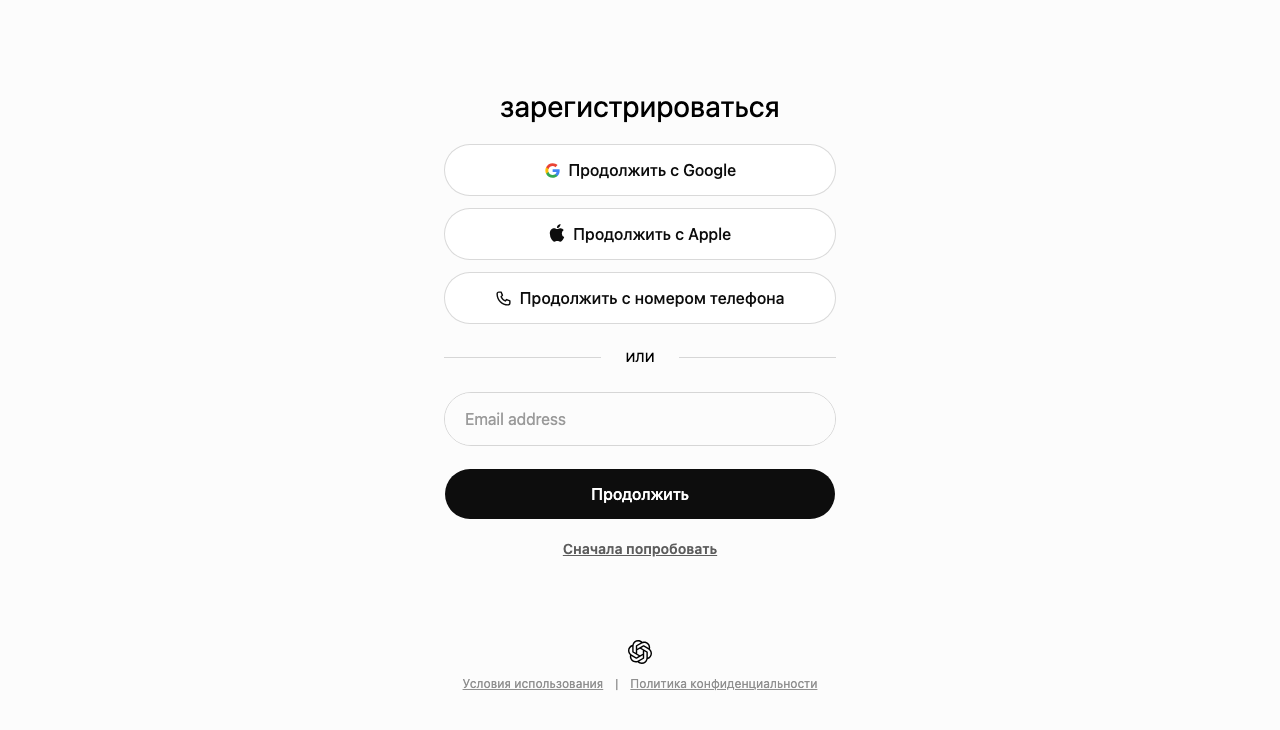
How it's done
Four steps, none of which needs anything beyond an email address.
- Open the official site — chatgpt.com. That exact address; we'll come to the clones shortly.
- Click "Sign up".
- Choose how to sign in. "Continue with Google" is the fastest and the safest: the service never gets your password, because it never sees one. The alternative is email and password, if you don't have a Google account.
- Confirm your email via the link in the message and, if asked, your phone with an SMS code. That's protection against mass bot sign-ups, not data collection for spam.
Once an input box appears at the bottom of the screen, you're in. You could write your first message now, but it's better to wait for the next lessons: that's where we work out how to phrase things so the answer is actually useful.
Advice that saves you grief
Small things people regret later.
- Use a personal email, not a work one. A work address gets switched off the day you leave, and your whole conversation history goes with it.
- Make the password unique. Don't reuse your email password: a leak at one service then opens both. Simplest of all is to have no password and sign in with Google.
- Check the address bar. Search for "chatgpt" and it's easy to land on a copy with a similar name.
Which do you reckon is safer: a password you invented, or signing in with Google?
Signing in with Google. The service doesn't hold your password at all, so there's nothing to lose in a breach. On top of that Google adds two-factor protection: the login is confirmed by a second step, such as a code on your phone. A password you invented has to provide all of that on its own, and it usually doesn't.
Hang on — why is it free?
A fair question, and better closed before you sign up than picked at afterwards.
Every large company runs the same scheme: the free tier is a shop window. You try it, you get used to it, and when you hit the limits some people buy a subscription. Along the way the company collects feedback it uses to improve the models.
There's a third element too: on 9 February 2026 OpenAI began testing ads in ChatGPT — for now only in the US, only for signed-in adults on the Free and Go tiers. There are no ads on Plus, Pro or business plans. The ads are labelled as sponsored, kept separate from the answer, and don't affect what it says.
So free access is starting to pay for itself partly through advertising. There's no hidden catch about selling your address to spammers. What genuinely deserves your attention is whether your conversations get used to train the models — and there's a whole lesson on settings coming up for that.
The story of the fake ChatGPTs
In spring 2023, when AI was all anyone talked about, Sophos researchers took apart a batch of ChatGPT clone apps on the App Store and Google Play, noting that there were noticeably more where those came from.
The scheme is brazen. The icon looks like the real one, the name is something like "ChatGPT AI Chat", and inside sits a subscription at $8 a week for what OpenAI gives away. These apps even earned their own name: fleeceware, because they quietly fleece whoever installs them.
The lesson is simple and won't age: use the address from this lesson, and only install the app published by OpenAI. The saving is $30 a month upwards, plus one account that never gets stolen.
If something goes wrong
Four situations that trip people up most often.
- The confirmation email never arrives Check Spam and Promotions — mail from new services often lands there. Nothing after several minutes? Hit "resend"; emails do get lost on the way.
- "This number can't be used" The service blocks virtual and disposable numbers. You need an ordinary mobile; it's linked once and never needed again.
- "Too many attempts" That's brute-force protection, and your account is fine. Wait a while and try again — the counter resets itself.
- You've forgotten which email you used This happens a month later, when you actually need the account. Click "Continue with Google": if that's how you signed up, it all comes back on its own.
Those four lines cover almost everything that can go wrong while signing up.
Lesson checklist
Run your eye down the list — all four items should be closed.
- ChatGPT account created
- signed in with Google, if you have a Google account
- the address is chatgpt.com, not something similar
- phone confirmed, if you were asked
If everything is ticked, the sign-up is done — the work starts in the next lesson.
Do this now
Create the account and leave the tab open: you'll need it in the next lesson, where we install the app and work out where AI suits you better — on your phone or at your computer.
Short questions on the lesson — with an explanation for every answer.